
Custom Properties: Transform Your CRM from Rolodex to Revenue Tool
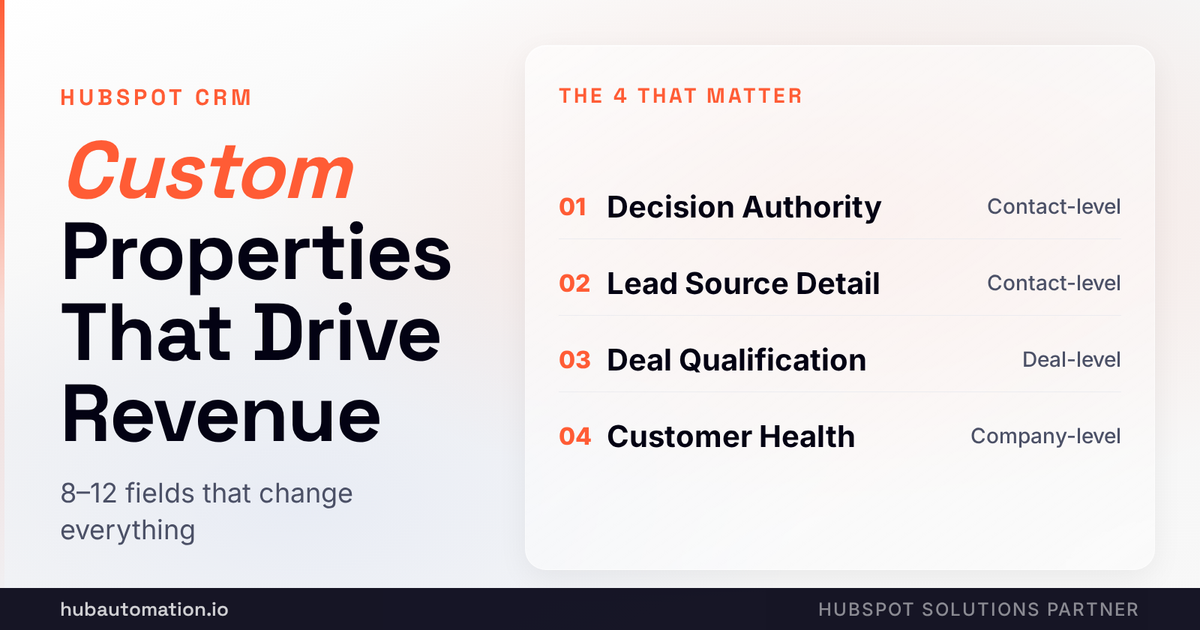
Right now, your HubSpot portal is a really expensive Rolodex. It tracks contacts. It tracks deals. But it doesn't track what actually matters for YOUR business. The standard fields that come out of the box don't tell you why a deal closes, why a customer churns, or why one lead becomes a customer and another disappears. That's because the fields that matter aren't generic. They're specific to how YOU sell. And that's where custom properties come in. Let's check it out!
Why Do Generic CRM Fields Cost You Money?
HubSpot gives you solid standard fields. Company name, revenue, number of employees. Contact name, title, email. Deal name, amount, close date. All necessary. But none of those fields answer the questions that actually matter for YOUR business.
Company name tells you who they are. But it doesn't tell you HOW they found you. Did they come from LinkedIn ads? SEO? Partner referral? Cold outreach? According to sales conversion research, a lead from a referral closes at 3x the rate of a cold outreach lead. But if you're not tracking source in a way that reveals that pattern, you're making budget decisions blind.
Deal amount tells you how much you're closing, but not whether it's a good deal for you. Maybe a $50,000 deal takes 5 weeks to close and requires 30 sales calls. Maybe a $200,000 deal takes 12 weeks and requires 100 calls. Unless you're tracking effort-per-deal and time-to-close, you don't know whether your sales team is being efficient.
Contact title tells you someone is a "VP of Marketing." But it doesn't tell you whether they're a decision maker, an influencer, or just someone who talks a lot on Zoom. Different approaches. But if you're not tracking decision-making authority explicitly, you're running the same playbook on both.
Generic fields track what's there. Custom properties track what matters for YOUR revenue model. And honestly? We love working with companies who get this because it immediately changes how the business runs.
What Custom Properties Actually Drive Revenue Decisions?
We've implemented hundreds of custom properties across companies. Some are great. Most are noise. Let's talk about the ones that consistently drive better revenue decisions.
How Do You Track Decision-Making Power in HubSpot?
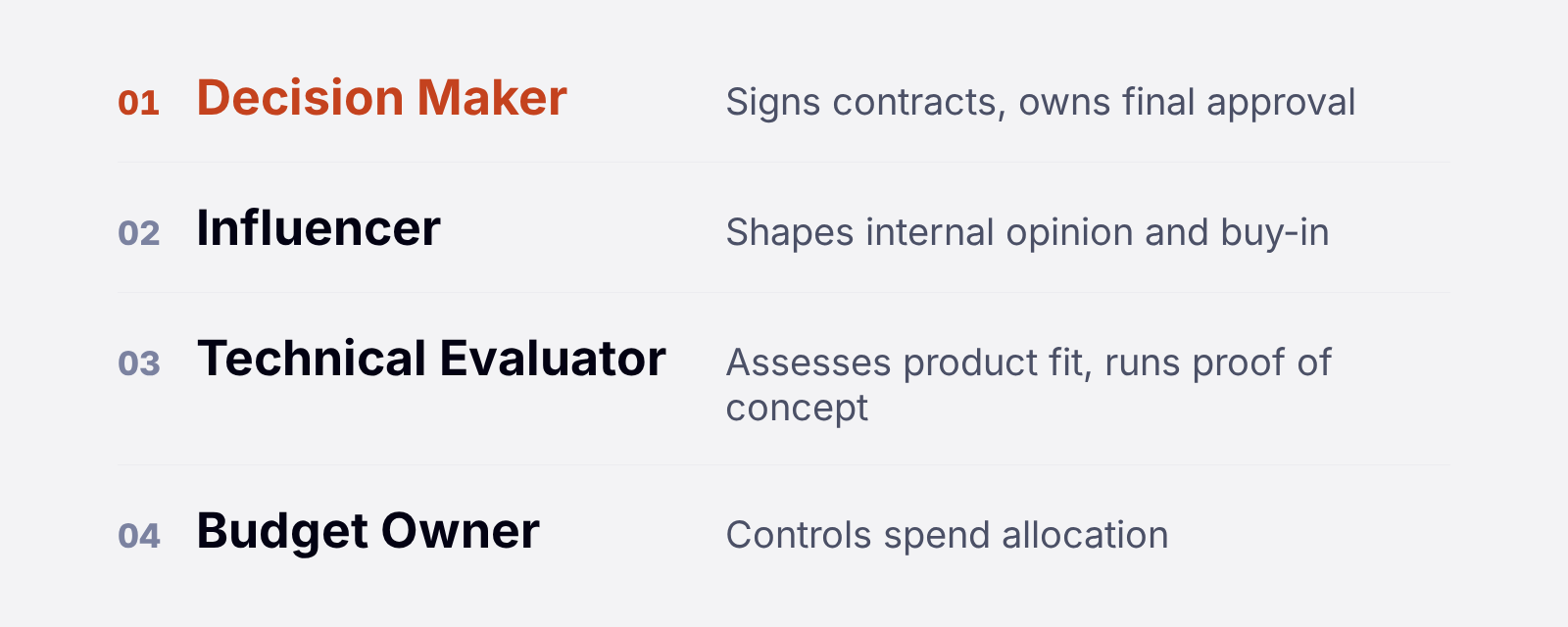
Here's a custom property that changes everything: Decision Authority. Values: Decision Maker, Influencer, Technical Evaluator, Budget Owner, Other.
Why does this matter? Because when your sales team has visibility into who actually has power, they can focus on the right people. A deal with five contacts where zero are decision makers is a dead deal. A deal with one decision maker who's genuinely committed is a real deal.
Another one: Champion Status. Values: Strong, Moderate, Weak, None, TBD. This tells your team whether the contact is actively pushing for your deal inside their company or just passively interested. A deal with a Strong champion usually closes. A deal with a Weak champion usually dies. That distinction is the difference between accurate forecasting and fantasy.
Third: Last Meaningful Contact Date. When was the last time you had a REAL conversation with this person, not just a marketing email? If it was more than 30 days ago, you should know that. Because deals don't close on old conversations. They close on momentum.
How Do You Improve Deal Qualification in HubSpot?
Here's a set of custom properties that transform deal accuracy: Budget Confirmed, Timeline Confirmed, Problem Recognition, Solution Awareness, and Competing Solutions Identified.
These are all yes/no fields. And when all five are true, you've basically got a deal that's qualified. When three are true, you've got a prospect that's in early stages. When zero are true, you've got a conversation that shouldn't be in your pipeline.
Why does this matter? Because right now your pipeline looks like this: 30% deals that are real, 40% deals that are early stage but could become something, 30% deals that are complete fantasies. But you're lumping them all together and forecasting as if they're equally likely to close. So your forecast is always wildly off.
Add these fields, fill them out honestly, and suddenly you can predict what's actually going to close with 80%+ accuracy according to sales forecasting best practices. That's transformational. That said, this only works if your team is disciplined about filling them out truthfully.
How Do You Track Lead Sources That Actually Convert?
HubSpot gives you a "Lead Source" field. That's usually: Direct Traffic, Organic Search, Paid Search, Social Media, Referral, Partner, Sales Outreach, Other. Useful, but not specific enough.
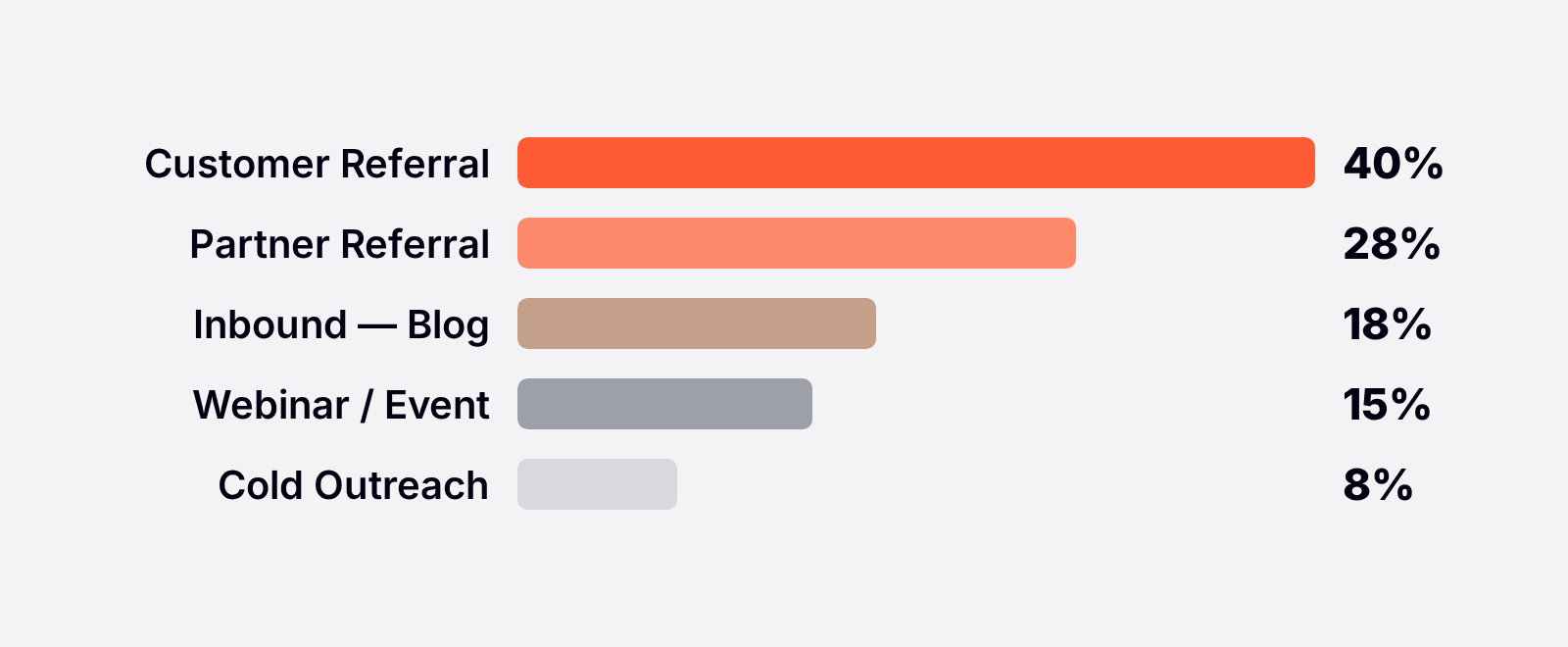
Add a custom property: Lead Source Detail. This is a dropdown with your specific sources: LinkedIn Ads, Google Ads, SEO - Blog, SEO - Resource, Inbound Form, Salesperson Outreach (Cold), Salesperson Outreach (Warm Intro), Customer Referral, Partner Referral, Webinar, Event, PR, Other.
Why does this matter? Different sources convert at wildly different rates. A customer referral might close at 40%. A cold LinkedIn outreach might close at 8%. If you're allocating budget based on total inbound volume instead of source-specific conversion, you're funding your worst channels and cutting your best.
And here's the thing: you probably don't KNOW which sources convert best because you're not tracking detail granularly enough. The custom property forces that visibility. Then you can actually optimize where your marketing and sales effort goes.
What About Customer Health and Expansion Revenue?
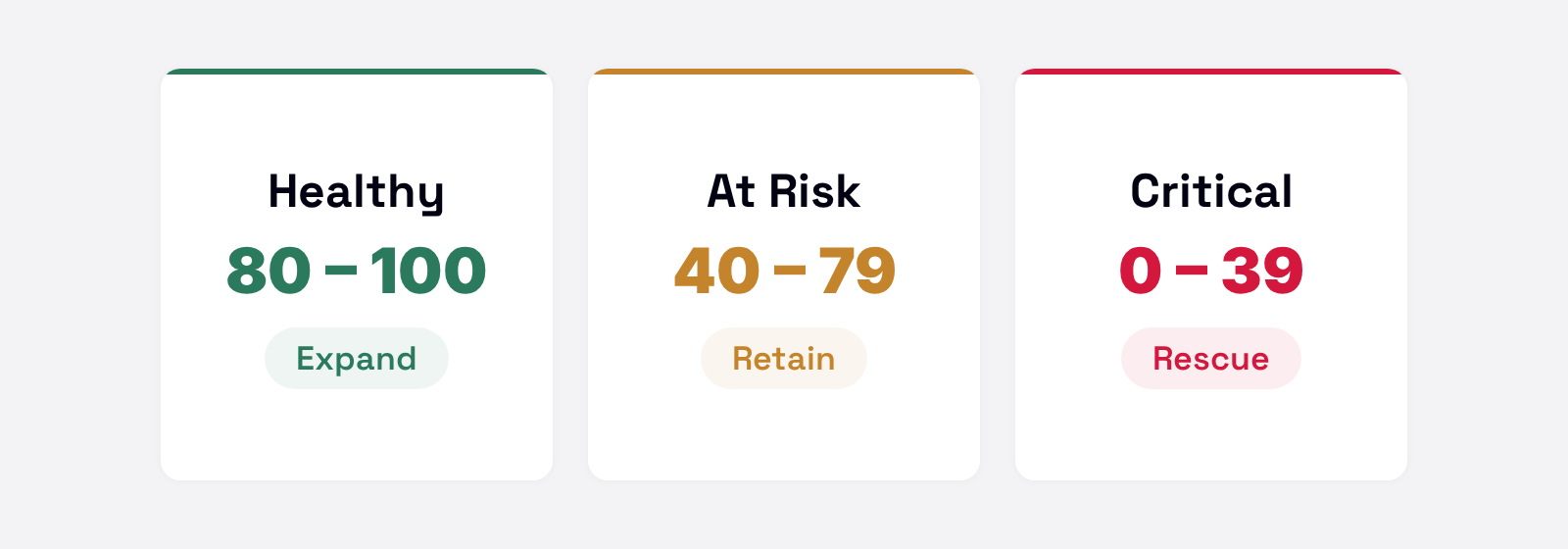
This is maybe the most important custom property for expansion and retention. Create a Customer Health Score for all your customer accounts. Scoring: Healthy (green), At Risk (yellow), Critical (red).
Inputs to this score: support ticket volume, feature adoption, renewal date approaching, expansion revenue opportunity, executive engagement, NPS score. You can automate this calculation in HubSpot using workflows. Every time any of these inputs changes, the health score updates.
But here's what makes this REALLY powerful: when your sales team has visibility into customer health, they can identify expansion opportunities. An account that's healthy and has been a customer for two years with no expansion? That's an upsell opportunity. An account that's at-risk health with an expansion opportunity coming up? Maybe you DON'T try to expand. Maybe you focus on retention instead.
That kind of strategic nuance only becomes possible when you're tracking the right data. And it directly impacts your net retention rate.
How Do You Implement Custom Properties Without Creating Chaos?
Here's the key: you don't want 47 custom fields. You want the 8-12 that actually change how you make decisions.
Start by asking yourself: what information would change my sales decision if I had it? Not nice-to-have info. Decision-changing info. If I knew X, I would do Y differently. That's a candidate for a custom property.
Second, make sure the field is actually trackable. Don't create a property for "company culture" that you're expecting your sales team to assess in a discovery call. That's too subjective. Do create a property for "company culture fit" with explicit criteria: aligned with our values (yes/no). Trackable. Objective. Clear.
Third, decide how you'll populate it. Auto-calculated? Manual entry? Pulled from an integration? Auto-calculated fields are most reliable. Manual entry fields need discipline. Both are fine as long as you understand what you're getting.
Fourth, connect it to your decision-making. A custom property that nobody uses is just noise. So whatever you create, make sure there's a workflow or a report that actually uses it.
What Custom Properties Fail and Why?
Most implementations have at least one custom property that everyone ignores.
Properties that require subjective judgment fail. "Company Culture Fit" that's supposed to be manually assessed? Ignored. "Deal Quality" that's supposed to be rated on a scale of 1-10? Everyone puts 7 and the field becomes useless.
Properties that aren't connected to action fail. You create a property but nobody's workflow or report actually uses it. So it gets populated sometimes, ignored other times, and becomes noise.
Properties that are too hard to populate fail. If a property requires looking up external data or doing research, most people won't do it. Auto-populated properties are gold. Manual entry properties are friction.
The winner properties? Ones that are auto-calculated or easy to populate, clearly tied to action, and aligned with how people are actually measured.
What Changes When You Get This Right?
Here's what happens when you build the right custom properties and actually use them.
Forecast accuracy improves immediately. You're no longer guessing which deals are real. You're measuring qualification explicitly. And reliable forecasts change everything about how leadership can run the business.
Sales cycle shrinks because your team knows exactly what questions to ask and in what order. A deal missing budget confirmation? You know you need to have that conversation. You're not wandering through sales conversations blindly. You've got a map.
Close rate improves because you're disqualifying junk faster. The deals that don't have real budget or timeline? They get filtered out sooner. You're not spending weeks on fantasies. You're focused on real opportunities.
Customer success becomes proactive instead of reactive. With customer health scores visible, they know exactly which accounts need attention before they churn. They can identify expansion opportunities. They can prioritize their own time.
And that's good for us. Because when all of this is visible and measurable, the entire organization runs better. Less chaos. Less guessing. More data-driven decisions.
Not sure which custom properties would transform YOUR revenue process? Book a free portal audit with HubAutomation and we'll analyze your current data and recommend 8-10 custom properties designed specifically for your business model. We'll show you how to implement them and how to use them to improve close rates, sales cycle, and customer success.
We are bullish on HubSpot's custom property capabilities and believe they're only going to get more powerful as the platform evolves. The companies that are winning right now? They've invested time in designing a system that reflects their reality. That makes their team smarter and faster because the system is feeding them exactly the information they need to win.
HubAutomation is a certified HubSpot Solutions Partner specializing in migrations, integrations, and portal optimization.
Want to see where your blind spots are? We run free diagnostics for companies like yours.
Want to see where your CRM is leaking revenue?
We run free 30-minute HubSpot diagnostics. Your portal, on screen, live. You leave with a prioritized fix list, yours to keep whether you hire us or not.
| Book my free 30-min audit |