
The Integration Stack: Connecting HubSpot to Your Actual Tech Stack
The Integration Stack: Connecting HubSpot to Your Actual Tech Stack
HubSpot is great at what it does. But here's the thing: HubSpot is not your entire tech stack. Your company uses... let's see... your ERP system, your accounting software, your marketing automation tool, maybe a data warehouse, definitely some support software, possibly some AI tools we haven't even named yet. And if HubSpot isn't connected to all of those systems, your data is living in silos. And when your data lives in silos, your decisions suck.
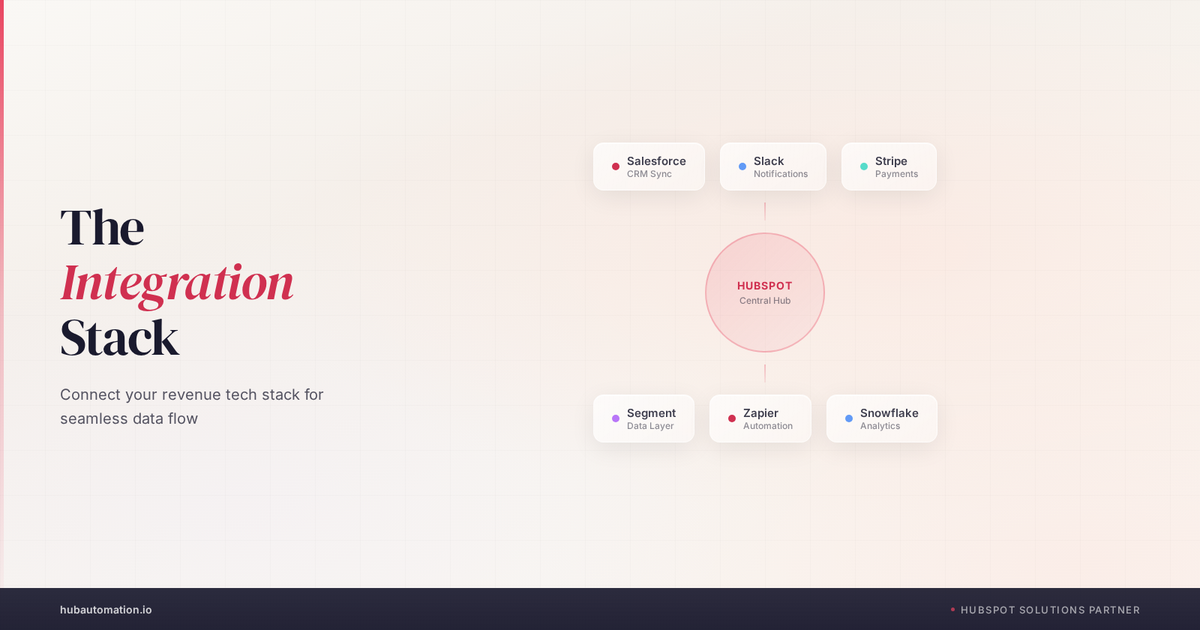
The integration stack is the architecture that connects all of these tools into a coherent system. It's the nervous system of your revenue operation. And here's what we've learned: how you BUILD this integration stack. What you integrate, HOW you integrate, and WHY. Is often more important than the tools themselves. Let's check it out!
What Should Actually Be Connected To HubSpot?
Before we talk about how to integrate, let's be clear about WHAT should be integrated. Your ideal integration stack connects to five core categories of systems: your ERP/financial system, your marketing tools, your support/customer success tools, your data infrastructure, and your operational tools.
Let's think about your ERP first. This is where your ACTUAL business data lives. Your orders, your revenue, your fulfillment, your inventory. HubSpot knows about deals, but your ERP knows about what's actually happening in your business. If your HubSpot deal closes but your fulfillment is delayed, your ERP knows that before HubSpot does. And if your customer success team doesn't know about fulfillment delays, they're going to make decisions based on incomplete information. So your ERP and HubSpot need to talk. That's not optional.
Your marketing tools, whether that's HubSpot's own marketing tools or a different platform like Marketo or Salesforce Marketing Cloud. Need to feed activity and engagement data back into your CRM. A prospect who engages with five pieces of content is different from a prospect who ignores everything. Your sales team needs to know that. Without this integration, you're missing behavioral signals that should shape your selling approach.
Customer success tools. Gainsight, Totango, or even just HubSpot's Service Hub. Need to be connected because your customer health is a LEADING indicator of your next quarter's revenue. A customer who's disengaging is likely to churn. A customer whose usage is declining might be ready for an upsell. Without this visibility, your sales team is hunting for net new business when the best business is sitting in your installed base.
Your data warehouse or data lake, whether that's Snowflake, BigQuery, or something else. Is becoming increasingly important. This is where you're bringing all of your data together for analytics, for AI models, for insights that no single system can give you. If HubSpot isn't connected to your data warehouse, you're doing analysis on incomplete data.
And operational tools like your calendar system, your communication tools, even your productivity apps, these matter too. When HubSpot knows your rep's calendar, it can create automatic availability windows for meetings. When it's connected to Slack, it can surface deal alerts in real time. When it's connected to your email, it can surface customer context right when the rep needs it.
Something we love about thinking about integration stack as a WHOLE is that you start to see patterns. You're not just connecting individual tools. You're building a system where information flows automatically and decisions can be made with better data. And that's the real win.
Three Ways To Integrate: Native, API, and Middleware
Now, how do you actually build these connections? There are three main approaches: NATIVE integrations, API integrations, and middleware platforms. And honestly, most mature companies end up using all three. Let's understand when each one makes sense.
Native integrations are the easy button. These are integrations that HubSpot has already built and maintains. Slack, Salesforce, Gmail, Outlook, Microsoft Teams, these work automatically and you just flip a switch. The advantage is simplicity. No custom code, no maintenance, no need for an engineer. The disadvantage is that you're limited to what HubSpot decided was important. If you need data from HubSpot to flow somewhere in a specific way that HubSpot's native integration doesn't support, you're out of luck.
API integrations are the DIY approach. You (or more likely, a developer on your team or an implementation partner) write code that pulls data FROM one system and PUSHES it TO another. This gives you complete flexibility. You can integrate ANY system, in ANY way, with ANY rules and logic you want. The downside? It requires engineering resources. It requires maintenance. If the API changes, you need to update your code. And if something breaks, you're troubleshooting custom code, not a pre-built integration.
Middleware platforms. Tools like Zapier, Make, or more sophisticated platforms like integration-platform-as-a-service solutions. Sit in the middle. They give you the flexibility of API integrations with the simplicity of native integrations. Most middleware handles the connectivity, you configure the logic through a UI, and you're not writing custom code. The tradeoff is that middleware adds cost and another system to manage. But for many companies, it's worth it.
Here's how we think about it: use native integrations for what you can. Move to middleware for integrations that are complex but not mission-critical. Use direct API integrations for your most important integrations where you need complete control and flexibility. And honestly, most mature companies end up with a mix of all three.
Meet Operations Hub: HubSpot's Answer To The Integration Problem
Here's something that's changed the game for a lot of HubSpot customers: Operations Hub. This is HubSpot's toolset for data integration and workflow automation at scale. It includes data sync capabilities that let you connect HubSpot to your other systems automatically.
What's powerful about Operations Hub is that it's built FOR the integration use cases we're talking about. It's not a general-purpose tool like Zapier. It's PURPOSE-BUILT for connecting HubSpot to your other business systems. You can sync data bidirectionally. You can create complex rules about WHEN and HOW data syncs. You can handle data transformations (converting data from one format to another). And it's maintained by HubSpot, so you're not managing custom code.
The catch? Operations Hub is a premium feature. It's not included in every HubSpot tier. And you need to understand your integration needs clearly before you invest in it. But for companies that have multiple systems that need to stay in sync, Operations Hub often saves more money than it costs because you're reducing the engineering resources needed to maintain custom integrations. Pretty sweet.
And that's good for us. Because once you have a solid integration layer between HubSpot and your other systems, your data quality automatically improves. Reps aren't manually entering information in multiple places. Data is syncing automatically. Information is current. Decisions are better.
Common Integration Mistakes (And How To Avoid Them)
We've seen teams build integration stacks that create more problems than they solve. Here are the most common mistakes.
Mistake #1: Integrating without defining the data model. You can't just START integrating systems and hope it works. You need to understand: what data exists in each system? What does it mean? How does it map? If your ERP calls a customer's "ship-to address" and HubSpot calls it "mailing address," are they the same? What happens when they conflict? We've seen teams spend months building integrations only to realize the data they're syncing is inconsistent. Define your data model first. Then build the integration.
Mistake #2: Creating one-directional integrations when you need bidirectional. You pull data FROM your ERP INTO HubSpot, but not the other way around. That works until a rep updates information in HubSpot and that change never makes it back to the ERP. Now you have two systems with different information and nobody knows which one is right. If data matters in both systems, it needs to flow both ways. That's not always easy, but it's important.
Mistake #3: Integrating everything. We've seen teams try to connect HubSpot to literally every tool they use. And you know what? Integration maintenance becomes a full-time job. You end up with a complex system that nobody fully understands. Something changes in one of the integrated systems and your whole integration stack breaks. Start with the 3-4 most critical integrations. Master those. Then add more. Don't try to boil the ocean.
Mistake #4: Not defining ownership. Who owns the integration? Who maintains it? Who do you call when it breaks? If nobody owns it, nobody fixes it. And broken integrations are worse than no integrations because you have stale or conflicting data. Assign an owner. Make it someone's actual responsibility.
Mistake #5: Syncing data you don't actually need. You CAN sync data from your ERP to HubSpot, so you do. But then nobody actually uses it. Your integration stack gets bloated. You're maintaining connections that create no value. Before you build an integration, ask: who will actually USE this data and how will it change their decision or their behavior? If you can't answer that, don't integrate it.
And honestly, the teams we work with that get their integration stacks right are asking these questions BEFORE they build. They're not integrating tools. They're solving business problems with integrations. And that's a totally different mindset.
ERP Integration: Where Most Teams Struggle The Most
If we had to pick ONE integration that's critical for RevOps maturity, it's ERP integration. Because your ERP is where the ACTUAL business happens. It's where orders are placed, where revenue is recognized, where fulfillment happens. And if your ERP is siloed from your HubSpot instance, your sales team is selling in the dark.
Here's what a good ERP integration looks like: when a HubSpot deal closes, relevant information syncs to the ERP to create an order. When the order ships, information comes back to HubSpot so your customer success team knows it's on its way. When there's a billing issue, HubSpot surfaces it because it's connected to your accounting data. When a customer's usage drops in your product, HubSpot knows because it's connected to your usage data in your ERP or product database.
The hard part? Most ERPs are complex. They have their own data structures, their own logic, their own way of doing things. They weren't built to talk to CRMs. So integrating them requires careful thinking about data mapping, about transformation logic, about error handling.
We've seen teams try to build ERP integrations and it TAKES a long time. And it's worth it. Because once it's done, your revenue operations function gets a huge upgrade. Sales visibility into fulfillment status, customer success visibility into orders, finance visibility into pipeline health. All of that becomes possible. But you need to go in with realistic expectations about timeline and complexity.
The Data Warehouse Integration: The Secret Weapon
Here's the integration that separates mature RevOps functions from everyone else: a data warehouse. If your HubSpot data is flowing into a central data warehouse (along with ERP data, customer success data, product usage data), then you can ask questions that no single system can answer.
For example: "What's the correlation between customer product adoption rate and churn risk?" That data lives partially in your product database (adoption) and partially in your customer success tool (churn). Neither system alone can answer the question. But if both are flowing into a data warehouse, you can query across them.
Or: "Which customer segments have the highest lifetime value?" That requires data from your sales system (how they were sold), your finance system (what they've paid), and your product system (how they're using it). Again, only a data warehouse can bring that together.
Something we love about mature RevOps functions is that they're not just managing the day-to-day pipeline. They're feeding data into analytics that inform strategic decisions. Data warehouse integration is how that happens.
The catch? Data warehouse integrations are typically more expensive and more complex than other integrations. They require ongoing maintenance. They require someone who can write SQL to actually use the data. But for companies that have complex revenue models or that are trying to optimize toward true revenue quality, not just velocity, a data warehouse integration is worth the investment. And that's good for us.
Making Your Integration Stack Actually Work
Okay, so you've decided what to integrate and how. Now what? Here's what we recommend:
First: document your integration architecture. Create a diagram (even a simple one) that shows all of your systems and how they're connected. What data flows where? When does it flow? What are the dependencies? This documentation will be invaluable when something breaks or when you need to onboard a new team member. And honestly, the act of documenting it will expose gaps and problems you didn't see before.
Second: test extensively before you go live. Test data mapping. Test error scenarios. Test what happens when a field is missing or formatted differently. Test what happens when you update data in one system and it needs to propagate to another. Integration issues in production are painful. Integration issues in testing are learning opportunities.
Third: establish monitoring and alerting. You need to know when a sync fails. You need to know when data is out of sync. You need dashboards showing the health of your integrations. If you're flying blind, you won't realize you have a problem until it's created downstream impacts.
Fourth: assign ownership and create runbooks. When an integration breaks, who fixes it? What's the process? Document it. Make it repeatable. And honestly, if your integrations break often enough that you need sophisticated runbooks, maybe you need to reevaluate your architecture.
And finally: iterate. Your integration stack isn't static. As your business evolves, your integration needs will evolve. Review your integrations quarterly. Are they still providing value? Are there new integration opportunities? Are there integrations you could simplify or sunset? This is active management, not set-it-and-forget-it.
Building Your Integration Roadmap
Don't try to integrate everything at once. Build a roadmap. Start with the integrations that will have the biggest impact on your revenue operations. Maybe that's your ERP, because you need order data in HubSpot. Maybe it's your product database, because usage data is critical to your customer success strategy. Maybe it's your marketing automation platform, because you need campaign performance data in your CRM.
Plan your first integration carefully. Document what you learn. Build processes. Then your second integration is faster and cheaper because you've already done the work of thinking through architecture. And your third is faster still. Pretty sweet.
And that's good for us. Because an integration stack that actually works transforms your revenue operation from disconnected systems into a coordinated engine. Data flows. Decisions improve. Your team has context when they need it. And that's when RevOps starts delivering real competitive advantage.
Your integration stack is the foundation of modern RevOps. Let's audit your current tech stack and build a practical integration roadmap. We'll look at what's integrated, what's siloed, where you're losing data, and where the biggest ROI opportunities are. Let's talk integrations, no charge to evaluate.
The tools you use are less important than how they're connected. A great integration stack with okay tools will outperform disconnected systems with amazing tools every single time. Because integration is where information becomes INTELLIGENCE. And intelligence is where competitive advantage lives.
We're HubAutomation, a certified HubSpot Solutions Partner. We specialize in building integration stacks that work, that sync reliably, that maintain data quality, and that actually solve business problems. Let's build your integration architecture together.
Want to see where your blind spots are? We run free diagnostics for companies like yours.
Want to see where your CRM is leaking revenue?
We run free 30-minute HubSpot diagnostics. Your portal, on screen, live. You leave with a prioritized fix list, yours to keep whether you hire us or not.
| Book my free 30-min audit |